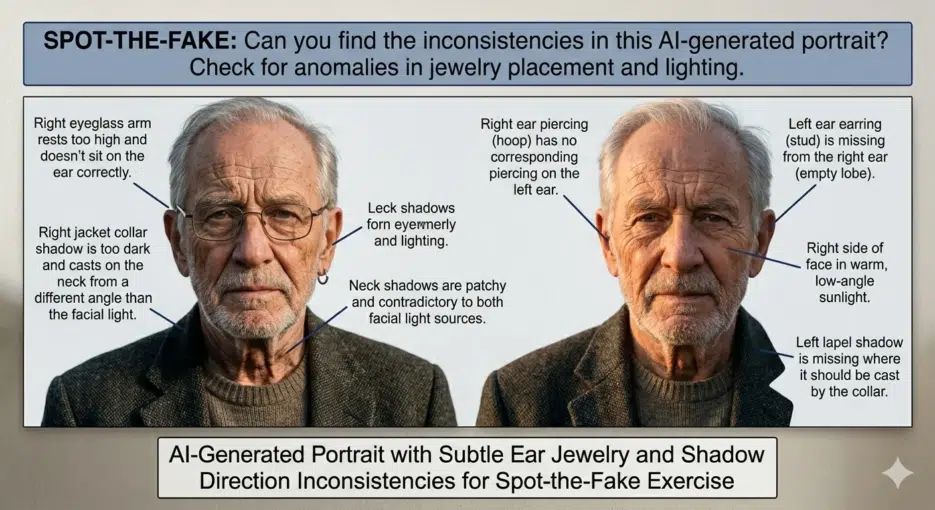
Honestly, I can barely tell AI images apart these days.
Back around 2023, you could catch most AI images just by checking three things: "six fingers," "garbled text," and "skin that's too smooth." I once got a perfect score on an online AI detection quiz—all 10 questions right—but if I took the same test now, I doubt I'd get even half of them. The latest models like Nano Banana Pro, GPT Image, and Midjourney v7 have fixed nearly all those "classic giveaways."
A few days ago, I was reading a PetaPixel article about Nano Banana 2, and one creator said: "You've been fooled by AI photos before, and you probably didn't even realize it." We've entered an era where that's not an exaggeration.
So I've put together what still works and what doesn't as of 2026.
First, the Dead Tips
"Count the Fingers" No Longer Works
"Check the finger count" was the golden rule of AI image detection in 2022–2023. A sixth finger, joints bending the wrong way, impossible poses—these were dead giveaways.
But as of 2026, major models render hands nearly perfectly. Midjourney v7 has significantly improved finger rendering, and Nano Banana Pro/2 also shows almost no noticeable errors in hand generation. You might still spot subtle errors in complex poses (like interlocked fingers), but the era of filtering AI by counting fingers is over.
"Garbled Text Means AI" Is Almost Invalid Too
AI images used to render signs and newspaper text as meaningless symbols—a reliable clue. This was honestly still quite effective through 2024.
But Nano Banana Pro's text rendering accuracy has been rated at 94%, and GPT Image also excels at text-containing images. For English, it's approaching near-perfection. Non-Latin scripts like Korean or Arabic are still unstable, but judging "AI or not" based solely on English text is now risky.
"Skin That's Too Smooth Means AI" — Also Weakening
This was already a somewhat ambiguous criterion given how prevalent Photoshop retouching is, and the latest models generate pores, blemishes, and fine wrinkles quite naturally. "Skin that's too perfect" isn't completely useless as a criterion, but its reliability has dropped significantly.
What Still Works in 2026
Just because the "classic" tips are dead doesn't mean you can't tell AI images apart at all. You just need to look more carefully.
Physical Consistency Check
This is the most effective visual detection method as of 2026. AI creates images that "look plausible," but it doesn't perfectly understand the laws of physics.
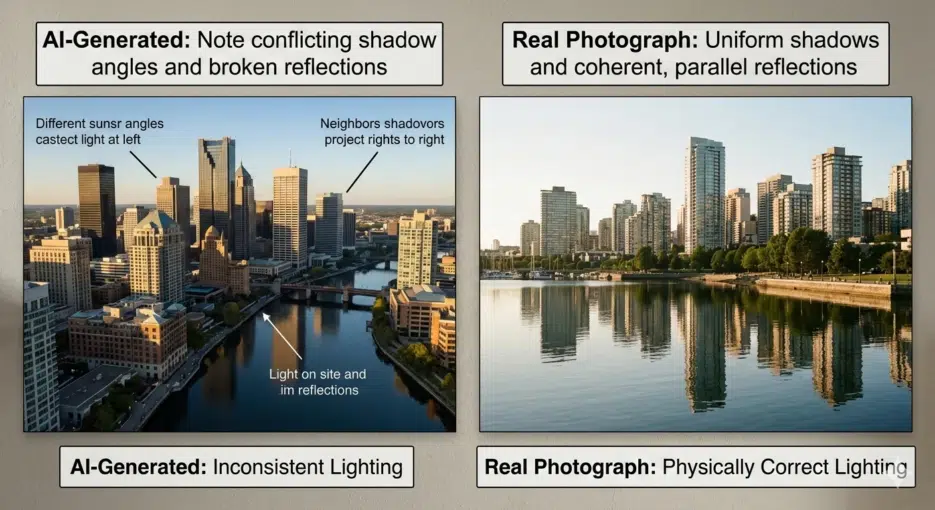
Shadow direction. If objects in the same scene cast shadows in different directions, that's suspicious. There's only one sun—if shadows point multiple ways, something's off.
Reflections. Check whether reflections in glass, puddles, or metal surfaces match the actual scene. AI draws reflections that look "roughly plausible," but the reflected content often doesn't match the original scene. Checking whether a building's glass windows reflect the actual surrounding buildings in cityscape images remains a valid method.
Vanishing points and perspective. Vertical lines of buildings being subtly tilted, or the background perspective not matching the foreground. This is subtle and hard to spot, but it's especially noticeable in architectural photos and cityscapes.
Context and Common Sense Check
This is often more effective than technical analysis.
First, ask yourself: "Could this photo have actually been taken in real life?" For example—a Sasquatch posing one meter from the camera? No matter how realistic the photo looks, if the situation itself is unrealistic, you should be suspicious.
For war photos, check whether the uniforms and helmets match the actual military forces of the countries involved, and whether the terrain matches the region. For celebrity photos, check if their skin is suspiciously smooth for their actual age (a 73-year-old with zero wrinkles?).
This kind of "common sense filter" remains effective no matter how much AI technology advances. AI only creates "plausible-looking images"—creating "logically sound situations" depends on the user's prompt.
Illogical Fashion/Accessories
AI still has a tendency to place accessories on people slightly wrong. Earrings not properly attached to earlobes, sunglasses arms coming through hair in physically impossible directions. This has decreased a lot but hasn't completely disappeared.
Historical accuracy errors are similar. Generate a "1950s street scene" and there might be an SUV in the background, or vehicles without license plates. AI inserts "visually similar" elements without guaranteeing historical accuracy.
Can't Spot It Visually? Technical Tools
Honestly, visual detection alone has its limits in 2026. According to research, even automated AI image detectors have seen their average accuracy drop to around 38% for images generated by post-2024 models. If detectors struggle, there's no way the human eye can do better.
SynthID + C2PA: Provenance Tracking Systems
Google's SynthID is a technology that embeds invisible digital watermarks at the pixel level when AI generates images. It's designed to survive common edits like resizing, compression, and cropping. Since its 2023 launch, watermarks have been applied to over 20 billion pieces of AI-generated content, and you can upload an image in the Gemini app and ask "Was this made by AI?" to check for SynthID.
C2PA (Coalition for Content Provenance and Authenticity) is a content provenance authentication standard with participants including Adobe, Microsoft, BBC, NYT, and Google. It records "what tool was used to create this image, when, and how" as encrypted metadata. Images generated by Nano Banana Pro/2 have started receiving both SynthID and C2PA simultaneously.
But the limitations are clear. SynthID can currently only detect images made with Google AI tools—it can't detect those from Midjourney or Stable Diffusion. C2PA metadata can be lost when taking screenshots or re-uploading. It's also vulnerable to deliberate watermark removal attacks.
"There is no silver bullet" is the consensus among industry experts.
AI Image Detection Tools
The performance of available detection tools is honestly inconsistent. In a recent test comparing 5 detectors, only TruthScan correctly detected all 10 test images, while the rest scored between 3 and 8. Winston AI only got 3 out of 10 right, making it essentially useless.
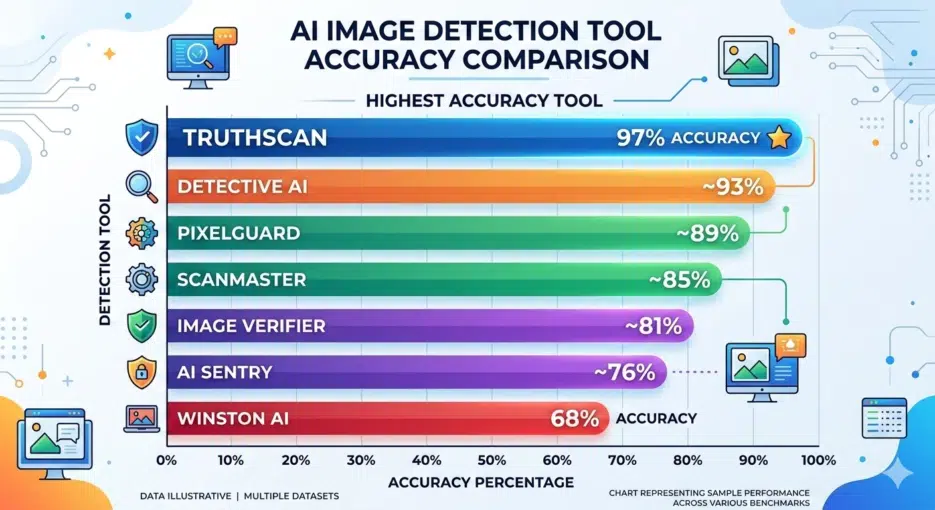
The key point when using detection tools: don't trust just one—cross-verify with 2–3. And even if a result says "Not AI," that doesn't guarantee it's a real photo. Detectors can be wrong too.
Checking with ELA (Error Level Analysis) Yourself
If you want a more technical approach, there's ELA. It analyzes JPEG compression error levels to check whether each part of an image has the same compression history. AI-generated images show different error patterns compared to photos taken with real cameras.
You can try it yourself with free online tools like FotoForensics, but honestly, interpreting ELA results as a regular user is pretty difficult. I spent about 2 hours practicing with various images, and "something's different, but is it different because of AI or because of Photoshop retouching?" was hard to distinguish. I'd say it's really an expert-level tool.
So What's the Conclusion?
Here's the uncomfortable truth: there is no way to identify AI images with 100% accuracy in 2026. Not with the naked eye, not with detection tools.
But we can't just give up, so here's a practical approach: