Lessons Learned While Boosting aickyway's Image Processing Pipeline Performance
How do places like Instagram and Pinterest process images in an instant? This tutorial covers how to build your own image pipeline capable of handling thousands of images per second by combining Node.js Worker Threads + Sharp + TensorFlow.js + Redis + WebSocket.
## TL;DR
- Separate CPU tasks with Worker Threads to avoid blocking the main thread
- Optimize format, resize, and compression with Sharp
- AI enhancement (sharpening, noise reduction, etc.) with **TensorFlow.js (tfjs-node)**
- State caching with Redis + real-time notifications via Pub/Sub
- Progress streaming with WebSocket
- In production: auto-scaling, monitoring, and rate limiting
## First, a 10-Second Technical Glossary
- Worker Threads: Offloads CPU-heavy work to background threads in Node.js. The main event loop stays unblocked.
- Sharp: An ultra-fast image transformation library. Quickly handles resizing, format conversion (JPEG/WEBP/AVIF), and compression.
- TensorFlow.js (tfjs-node): An AI inference engine that runs in Node.js. Loads models to enhance images.
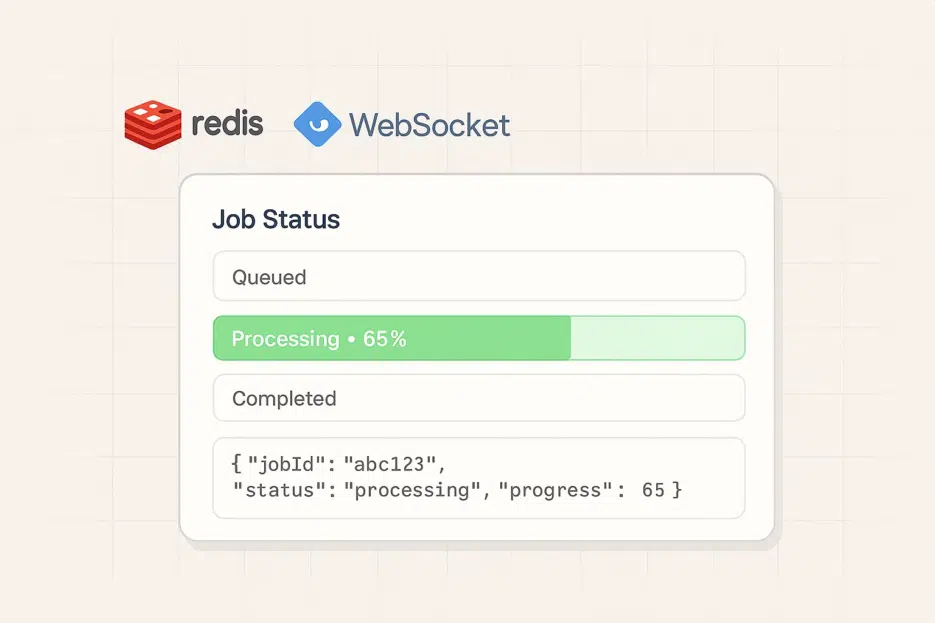
- Redis: An ultra-fast in-memory data store. Perfect for job state caching and real-time Pub/Sub.
- WebSocket: Bidirectional real-time communication from server to browser. Progress bars respond instantly.
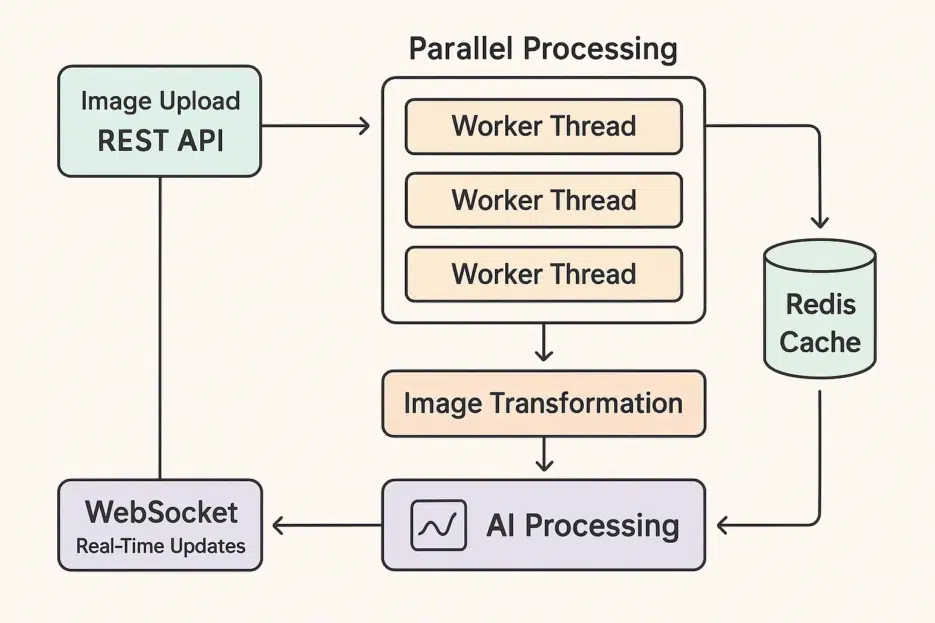
## Architecture at a Glance
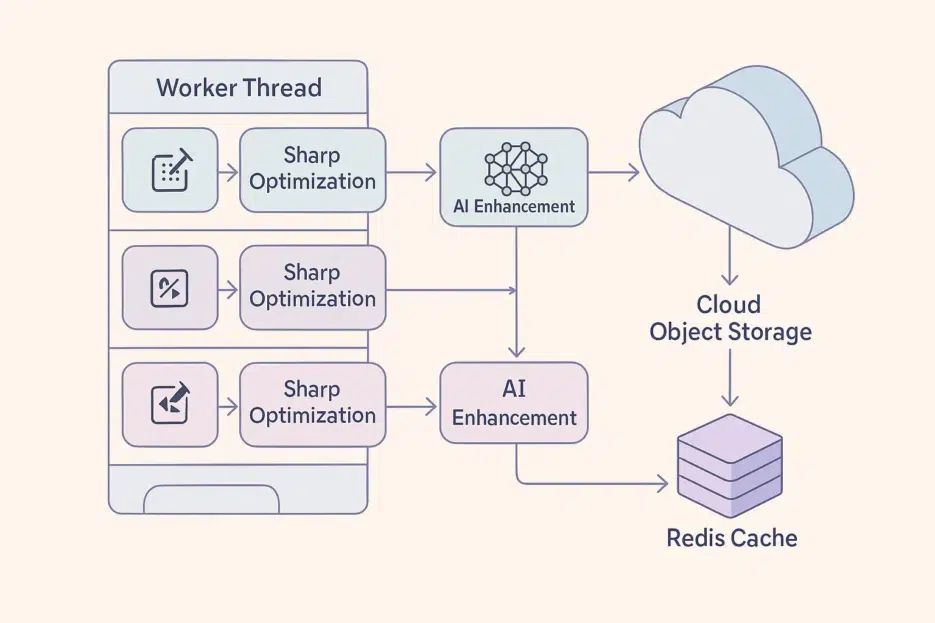
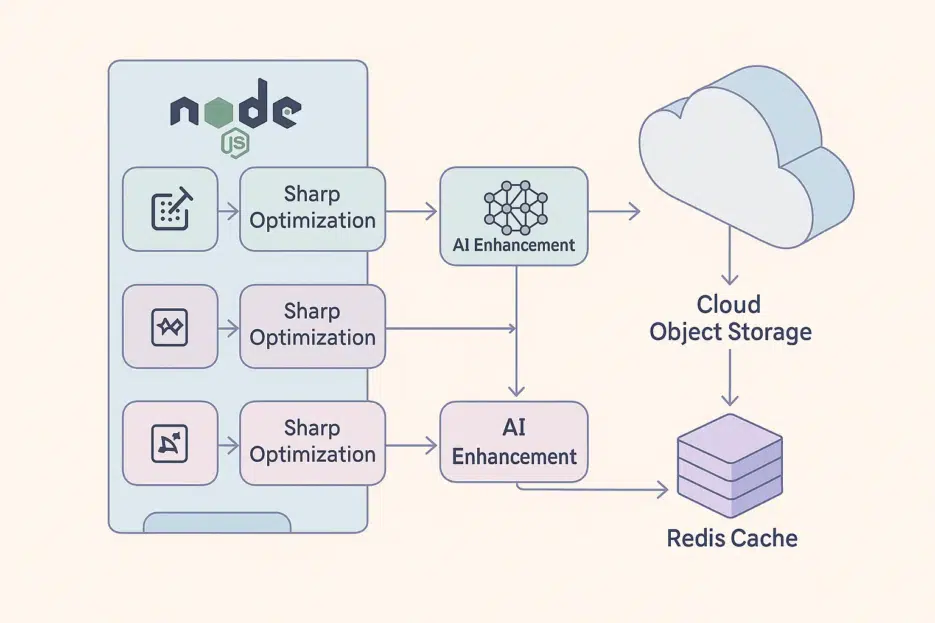
Upload → Queuing → Worker Thread (Sharp+AI) → Object Storage Save → Redis State Update/Publish → Client WebSocket Receive
## Project Setup
Node 18+ recommended (global fetch support)
mkdir image-processing-pipeline
cd image-processing-pipeline
npm init -y
# ESM + essential libraries
npm i express sharp @tensorflow/tfjs-node redis ws pino
# (optional) If you need UUID
npm i uuid
Enable ESM in package.json.
{
  "type": "module",
  "engines": { "node": ">=18" }
}
❗️Note
- It's **
@tensorflow/tfjs-node**, nottensorflow-node.- Browser-only
navigator.hardwareConcurrencydoesn't exist in Node. Use **os.cpus().length**.__dirnamedoesn't exist in ESM. Use **import.meta.url+fileURLToPath**.
## Server Entry: REST API + Redis + WS
// src/app.js
import http from 'node:http'
import express from 'express'
import { createClient } from 'redis'
import { WorkerPool } from './workers/pool.js'
import { setupWebSocket } from './websocket.js'
import os from 'node:os'
import { randomUUID } from 'node:crypto'

const app = express()
app.use(express.json({ limit: '2mb' }))

// Redis client (cache/state)
const redis = createClient({ url: process.env.REDIS_URL || 'redis://localhost:6379' })
await redis.connect()
// Duplicate client for Pub/Sub
const pub = redis.duplicate();
await pub.connect()

// Worker pool sized to CPU core count
const workerPool = new WorkerPool({ size: os.cpus().length, pub, redis })

app.post(,  (req, res) => {
   {
     { imageUrl, options = {} } = req. || {}
     (!imageUrl)  res.().({ :  })

     jobId = ()
     key =

     redis.(key, { : , : , : .() })

    workerPool.({ jobId, imageUrl, options })
    res.({ jobId })
  }  (e) {
    .(e)
    res.().({ :  })
  }
})

app.(,  (req, res) => {
   key =
   status =  redis.(key)
   (!status || .(status). === )  res.().({ :  })
  res.(status)
})

 server = http.(app)
(server, { redis })
server.(process.. || ,  .())
## Worker Pool: Safe and Resilient
// src/workers/pool.js
import { Worker } from 'node:worker_threads'
import { fileURLToPath } from 'node:url'
import { dirname } from 'node:path'

const __filename = fileURLToPath(import.meta.url)
const __dirname = dirname(__filename)

export class WorkerPool {
  constructor({ size, pub, redis }) {
    this.pub = pub
    this.redis = redis
    this.size = size
    this.workers = Array.from({ length: size }, () => this.#spawn())
    this.queue = []
  }

  #spawn() {
    const worker = new Worker(new URL('./worker.js', import.meta.url))
    worker.busy = false

    worker.(,  (msg) => {
       { jobId, type, data } = msg
       key =
       (type === ) {
         ..(key, { : , : data. })
         ..(key, .({ : , : data. }))
      }
       (type === ) {
        worker. =
         ..(key, {
          : ,
          : ,
          : data.,
          : data..,
          : data..,
          : data..,
          : .()
        })
         ..(key, .({ : , : , : data. }))
        .#()
      }
       (type === ) {
        worker. =
         ..(key, { : , : data., : .() })
         ..(key, .({ : , : data. }))
        .#()
      }
    })

    worker.(,  {
      worker. =
      .(, err)

      ..(.#())
      .#()
    })

     worker
  }

  () {
    ..(job)
    .#()
  }

  #() {
     idle = ..( !w.)
     (!idle || .. === )
     job = ..()
    idle. =
    idle.(job)
  }
}
## Worker: AI Enhancement with Sharp + tfjs-node
// src/workers/worker.js
import { parentPort } from 'node:worker_threads'
import sharp from 'sharp'
import * as tf from '@tensorflow/tfjs-node'

// Load model only once
const model = await tf.loadLayersModel('file://models/enhancement/model.json')

async function uploadToStorage(buffer) {
  // TODO: Upload to S3/GCS/Cloudflare R2 and return public URL
  // Demo returns data URL
  return `data:image/png;base64,${buffer.toString('base64')}`
}

parentPort.on('message', async ({ jobId, imageUrl, options }) => {
  try {
    // 1) Download image
    const res = await fetch(imageUrl, { signal: AbortSignal.timeout(20_000) })
    if (!res.ok) throw new Error(`download failed: ${res.status}`)
    const arr = await res.arrayBuffer()
    const inputBuffer = .(arr)

    parentPort.({ jobId, : , : { :  } })


     maxW = options. ??
     maxH = options. ??
     quality = options. ??

     pipeline = (inputBuffer)
      .()
      .()
      .(maxW, maxH, { : , :  })


     format = options. ??
     (format === ) pipeline = pipeline.({ quality, :  })
      (format === ) pipeline = pipeline.({ quality, :  })
     pipeline = pipeline.({ quality, :  })

     optimized =  pipeline.()

    parentPort.({ jobId, : , : { :  } })


     img = tf..(optimized, )
     input = img.().().()
     pred = model.(input)
     out = pred.().().(, ).()
     finalBuffer =  tf..(out)
    tf.([img, input, pred, out])

    parentPort.({ jobId, : , : { :  } })


     url =  (finalBuffer)

    parentPort.({
      jobId,
      : ,
      : {
        url,
        : { : , : , :  }
      }
    })
  }  (e) {
    parentPort.({ jobId, : , : { : e. } })
  }
})
## Real-Time Progress: Redis Pub/Sub + WebSocket
// src/websocket.js
import WebSocket, { WebSocketServer } from 'ws'

export function setupWebSocket(server, { redis }) {
  const wss = new WebSocketServer({ server })
  wss.on('connection', async (ws) => {
    let subscribedKey = null

    ws.on('message', async (raw) => {
      try {
        const { type, jobId } = JSON.parse(raw)
        const key = `job:${jobId}`
        if (type === 'subscribe') {
          subscribedKey = key
          const status = await redis.hGetAll(key)
          ws.send(JSON.stringify({ jobId, status }))
          // Redis Pub/Sub subscription
          const sub = redis.duplicate(); await sub.connect()
          await sub.subscribe(key, (message) => ws.readyState === 1 && ws.send(JSON.({ jobId, : .(message) })))
          ws.(,  () => {  {  sub.(key);  sub.() }  (_) {} })
        }
      }  (e) {
        ws.(.({ : e. }))
      }
    })
  })
}
## Performance Tips (Production-Ready Checklist)
- Batching: Batch jobs with the same options to a single worker to benefit from disk/model load caching.
- Memory Safeguards: Block risks with
sharp.limitInputPixels, max upload size, andAbortSignal.timeout. - Backpressure: When queue length grows, apply rate limiting (HTTP 429) or spool to temporary storage.
- On-Demand Scaling: Adjust worker count based on queue length/processing time.
- Image Format Strategy: Photos = JPEG/AVIF, Graphics = WEBP/PNG. WEBP recommended for thumbnails.
- Model Optimization: Use tfjs-node GPU build (environment dependent),
modelWarmupto mitigate Cold Start. - Observability: Dashboard for p95 processing time, failure rate, queue length, and worker utilization.
- Error Recovery: Exponential backoff retry for network errors, fallback path (skip AI) for model errors.
- Security: Origin validation, URL whitelist, content type verification, image bomb prevention.
- Caching: Reuse transformation results with key-based caching (including option hash).
## Quick Benchmark Script
// benchmark.js
import { setTimeout as sleep } from 'node:timers/promises'

const HOST = process.env.HOST || 'http://localhost:3000'

async function runBenchmark() {
  const numImages = 200
  const jobs = Array.from({ length: numImages }, (_, i) => ({
    imageUrl: `https://picsum.photos/seed/${i}/1920/1080`,
    options: { width: 800, height: 800, quality: 80, format: 'webp' }
  }))

  const t0 = performance.now()
  const res = await Promise.all(jobs.map(j => fetch(`${HOST}/process-image`, {
    method: 'POST', headers: { 'Content-Type': 'application/json' }, body: JSON.(j)
  }).( r.())))


   ()
   t1 = performance.()

  .()
}

()
## Production Checklist
- Error/performance logging: pino + centralized logging
- Health checks & readiness probes (containers/Kubernetes)
- Rate limiting + input validation (Zod/Joi)
- CDN caching and expiration policies
- Model versioning and rollback switches
- Cost monitoring (traffic, egress, storage)
Conclusion
This pipeline frees up the main thread, offloads heavy images to Worker Threads, and combines Sharp with AI enhancement to achieve both quality and speed. Add Redis + WebSocket for aickyway-style real-time feedback, and you have a complete community-grade workflow where upload → processing → sharing flows seamlessly.